Build the complete budget
Home, land, delivery, site work, hookups, permits, contingency and fees. Separate costs paid in cash from costs you expect the lender to fund.
Before you pay a deposit
Bring the full project cost and your loan offers into one workspace. Keep unanswered questions beside the numbers before you commit to a tiny home.
One payment for the browser workspace and offline ZIP. Use your phone, tablet or computer.
Fictional example. These aren’t market prices or quotes, and they don’t represent savings.
Your payment is part of the budget
The free loan calculator already shows your payment and schedule. The kit helps you connect that number to the rest of the project.
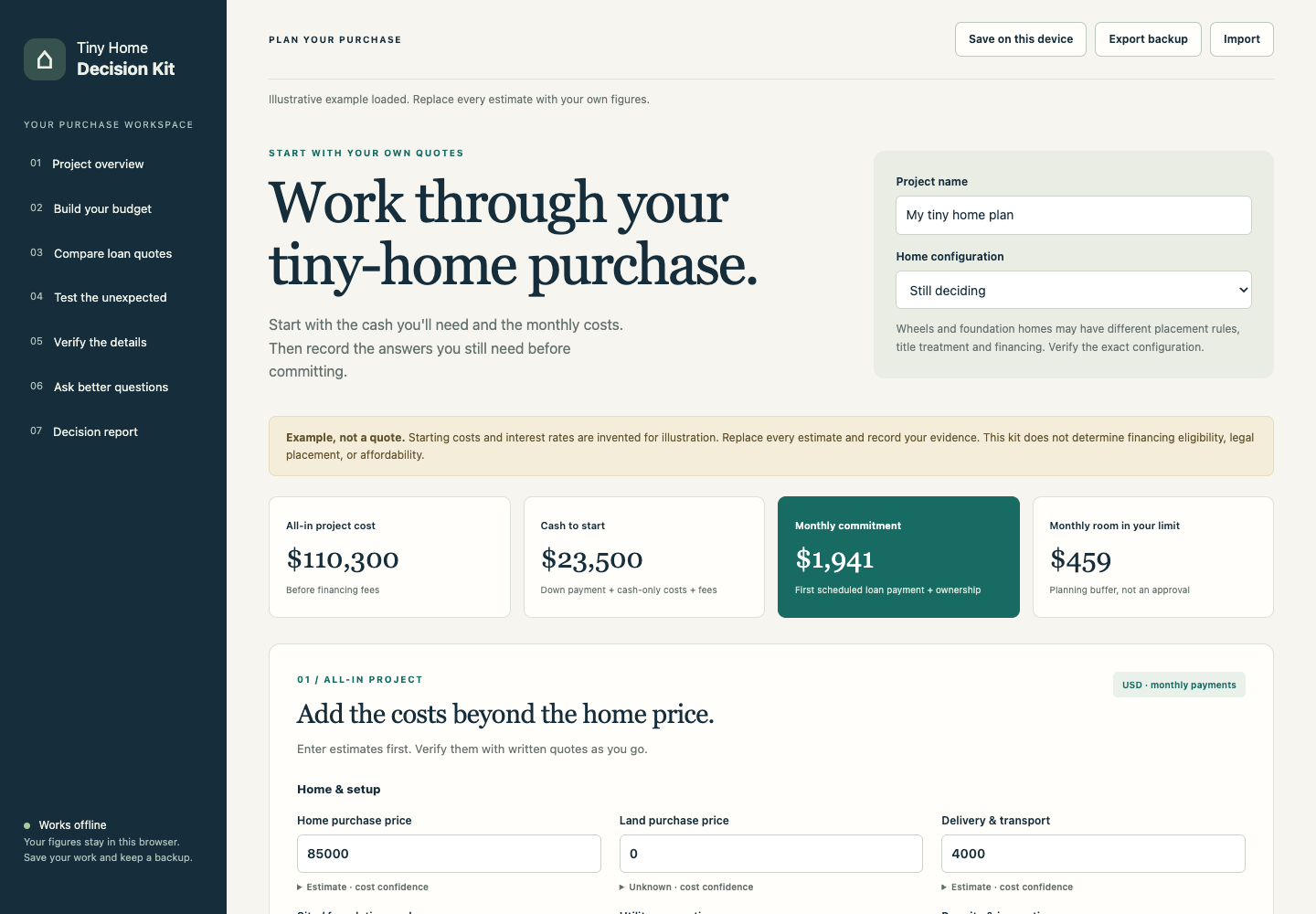
Home, land, delivery, site work, hookups, permits, contingency and fees. Separate costs paid in cash from costs you expect the lender to fund.
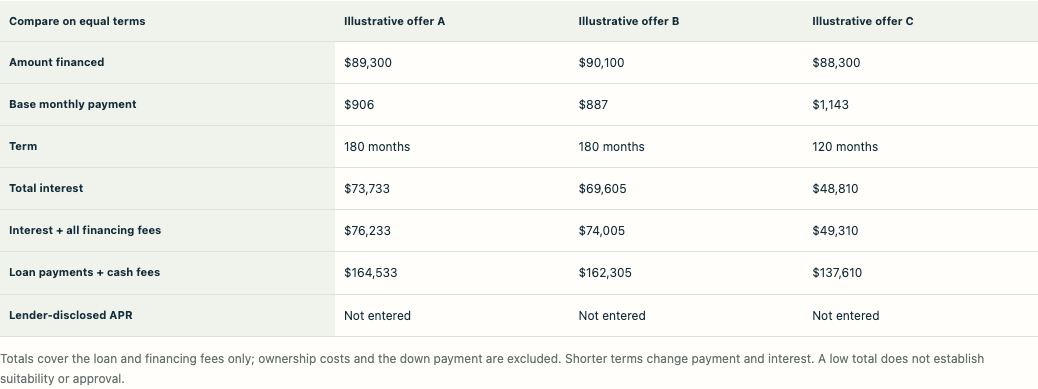
Compare the payment and total interest alongside financing fees. The contract interest rate stays separate from the lender-disclosed APR.
Change the starting rate or allow more for setup costs. Adjust lot rent, too. Check the resulting monthly cost against the planning limit you entered.
Record placement, construction standard, title, insurance and contract checks. Add the source of each written confirmation.
Use editable requests for your lender, builder, local authority and site owner. Identify exclusions before comparing headline prices.
Save your plan, export a private backup, print your report and export the monthly loan schedule. Revisit it when a quote changes.
See the actual workspace
The screenshots below show the included workspace with its fictional starting example. Build a budget and compare offers, with the evidence behind each assumption in the same plan.
Try part of the workflow
Add a setup allowance to the home price, then include monthly ownership costs. Change the fictional numbers to try the free preview.
The complete kit adds detailed cost categories, funding allocations, quote comparison, saved projects, stress scenarios and verification records.
The free preview shows one estimated loan and ownership cost. Need to compare written offers, save a project or keep a verification checklist? See the complete $99 kit.
View an illustrative completed decision report (PDF) →
For buyers collecting quotes
You’re considering a tiny home with an actual or estimated price. You need to organize the costs and written answers before committing, and you’re comfortable collecting your own quotes.
The kit uses USD for U.S. planning. After purchase, open the workspace in a modern browser on your device, or download and unzip the kit on a computer if you want to work offline and keep a local copy. A larger screen helps when comparing offers and printing reports. You don’t need an Excel subscription or a new account.
Tiny homes on wheels, foundation-built homes and manufactured homes can have different rules. Confirm the exact home and site with the responsible lender and local authority.
Keep your purchase plan together
The ZIP contains the current workspace and a practical buyer guide with editable templates. Keep and reuse your downloaded copy for your own household’s planning.
Use the browser workspace or offline download to build an all-in budget and compare three offers. Cost stress tests and a verification tracker keep assumptions visible.
Print a report or export the loan schedule as a CSV. The buyer field guide includes editable request templates. Save a JSON project backup and import it when you need to move your plan.
No subscription. Current version included.
Secure payment through Stripe. Any applicable tax is shown before payment. After payment, open your private browser workspace or download the ZIP.
Email support@zovo.one within 14 days of purchase with your order receipt to request a refund. No financial documents required. Your statutory rights are unaffected.
Lost your link? Email support@zovo.one with your Stripe receipt and we will resend it.
By purchasing, you agree to the product terms. See our privacy details.
After payment, select “Open workspace in browser” on your private access page. Use a phone or tablet, or open it on your computer. You’ll need an internet connection. For offline use, download and unzip the file. Open START-HERE.html for the contents and quickstart, then open app/index.html in Chrome, Safari, Firefox or Edge. Enable JavaScript to use it. The product doesn’t require an account or use external libraries.
Both the browser and offline workspaces keep your planning figures on your device. Opening the browser workspace requires an internet connection and purchase verification; your figures and notes are not sent to the server. Device saves and exported files remain under your control. Plans do not sync between devices or between the hosted and downloaded workspace; export a backup and import it to move your work. Stripe processes payment details separately. Do not include bank account numbers or identity documents in notes.
No. It helps you record the exact questions, responsible authority and written evidence. Permission depends on the home, location, use and applicable rules. A completed checklist is your own record, not a certification.
The existing lifetime offer on this site promises access to all tools. Email support@zovo.one with your membership receipt for access before making another purchase. Membership verification is handled by support.
Your purchase includes the version available at checkout. It does not include a personal finance, legal or construction review, nor a promise of future updates. Keep the downloaded ZIP and a backup of your project.
Keep the private recovery link shown after checkout. If you need help, email support@zovo.one with your Stripe receipt. Never email card details. The 14-day refund window also applies.